About NestPlay

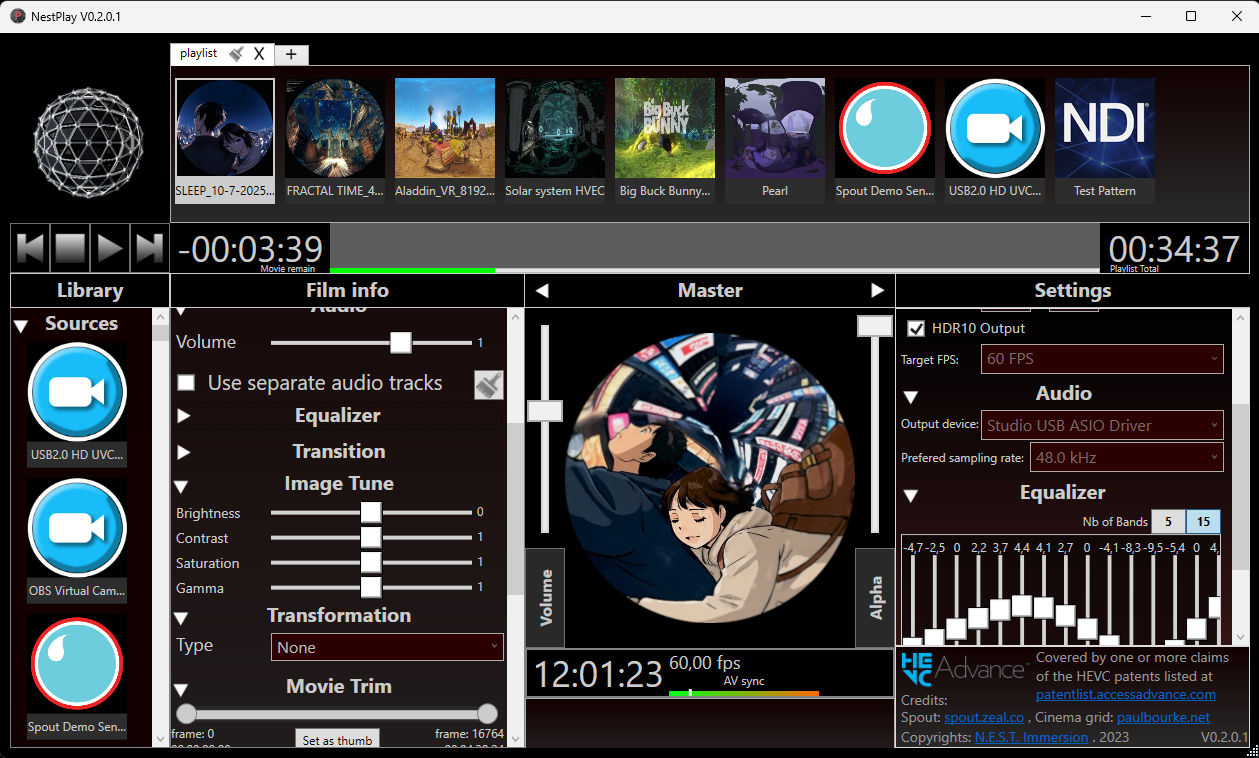
NestPlay User interface
 

NestPlay allows you to play high-resolution, high-fps visuals videos and broadcasts via Spout. With support for hardware video decoding and multichannel audio outputs, this apps is all you needs as a simple video playback without a complex workflow.

Key features

⇒ Hardware decoding of popular CODEC (h.264/HEVC/HAP)
⇒ High rez Spout output: > 8k @ 60 fps
⇒ Color adjustment (contrast, brightness, saturation, gamma)
⇒ Multichannel audio output support with ASIO devices
⇒ Spout sync with NestMap
⇒ Video-Audio sync
⇒ Multiple play sequence option
⇒ Intuitive interface, creating playlists
⇒ Touchscreen frendly interface
⇒ Transformation options (Pano to Fisheye, cinema)*
⇒ HDR 10bits Spout output*
⇒ Hardware decode HEVC 4:4:4 10/12 bits*
⇒ 5/15 bands Equalizer per channels*
⇒ Multiple input source (Spout, NDI, Capture cards)*
* => Available with NestPlay Pro only, need CUDA 13.1 capable GPU for some pro features
More Details

WHY ANOTHER MEDIA PLAYER

To be honest, there is plenty of choice in term of media player, why choosing NestPlay? While there is a lot of options, not all of them offer those three features that we offer with NestPlay:
⇒ Spout output
⇒ Multichannel audio
⇒ hardware decoding of mp4 CODECs

Tutorial

Video tutorial showing the main features of NestPlay Light.

COMPATIBILITY

Run on Microsoft Windows only. Using Spout, NestPlay is compatible with a ton of apps:

NestMap
NestDrop
NestNDI
Resolume
TouchDesigner
MadMapper
⇒ Any other software listed on the Spout website

NESTPLAY PRO

NestPlay Pro Edition

The Pro Edition is a more complete version of NestPlay. It includes all features of the Light edition but with even more options for professional uses:

⇒ HDR 10 bits Spout output
⇒ Geometric transformations (Panoramic to fisheye, Cinema mode)
⇒ Spout, NDI and video capture inputs
⇒ 5/15 Equalizer bands, per audio channels and per movie
⇒ Additionnal Fade In/Out

V2 Available Now

Have a doubt? Try our free demo version first.

Download Demo

FREE WITH NESTMAP

Yes, NestPlay is so a good match with NestMap, that we give a Light license with the purchase of a NestMap License. You can also get a discount on the Pro License if you have a NestMap License too. If you purchased a NestMap License and didn't receive a NestPlay Light License, contact us to get your free License.

Purchase it now

NestPlay Light or Pro Edition License will be send via email after a single payment. The License give you free updates for 12 months, then you can keep your current version after this period.
If you hesitate between Light and Pro, note that you can upgrade from Light to Pro with a link in the application and paying only the difference. If you already tested the demo and you are ready to get your license, hit the button below.


Requirements: Windows 10 or 11, NVIDIA is recommended but any GPU can be utilized. More Powerful GPU's can achieve higher resolution/fps.

Compare Versions

Light ($49USD or FREE with NestMap) Pro ($199USD or $149USD with NestMap)
High Resolution 8K
High Resolution 8K
4 Color controls
4 Color controls
Multichannel Audio
Multichannel Audio
Hardware video decoding:
Hardware decoding h.264/HEVC 420
⇒ MP4 h.264/HEVC 420 chroma
Hardware decoding h.264/HEVC 444
⇒ MP4 h.264/HEVC 444 chroma
Hardware decoding HAP codec
⇒ HAP codec
Multi playback list
Multi playback list
Using external audio track
Movie Trim
Movie Trim
Individual Volume
Individual Volume
Commercial Usages
Commercial Usages
Perpetual License
Perpetual License
HDR 10 bits Spout output
Spout Inputs
Spout Inputs
NDI Inputs
NDI Inputs
Capture Card Inputs
Capture Card Inputs
Audio Eq 5/15 bands
Audio Eq 5/15 bands
Video transformations(Cinema, VR)
Video transformations (Cinema, VR)

Contact us

Phone

Mobile: 1-819-574-3766


E-mail Address

info@nestimmersion.ca


Facebook

facebook.com/nestdome


Follow us